User Profile & Settings
The User Profile contains general information about the trading account, Common settings of the Web Terminal, settings of the Trade, Level II, Chart, Last Trades, World Markets Clock, and Notifications/Push-Notifications settings.
To open the User Profile window, choose Settings to the left of the TickTrader ECN account number.
If you haven't opened an ECN account yet, click Add account. You will be redirected to the Client Portal. Select Add Account > TickTrader ECN in the menu and fill in the account opening form. Users of the new Client Portal need to select Accounts > Add an account > TickTrader > ECN.
- Account e-mail: Registered email address.
- Nickname: The nickname is displayed in Trollbox. To change the nickname, click Edit, enter a new nickname, and then click Edit again.
TT Account Info
- TT Account Login/ Name: Trading account login / account name.
- TT Account Type: Trading account type.
- User Name: User name.
- Currency: Trading account currency.
- Leverage: Trading account leverage.
- Registration Date: Trading account registration date.
- TT Server Name: TickTrader Server name.
- TT Server Address: TickTrader Server address.
- Last Logins (via Web Terminal): Information about last logins to the trading account via Web Terminal.
- Active Sessions: Information about active sessions.
Common Settings
- In the Time zone, Date Format and Time Format fields, you can select the time zone, date format and time format of the Web Terminal.
- Session Timeout: Session timeout period.
- Symbol Name Displaying: Choose format of the Symbol names at Market Watch panel: Symbol name (e.g. #AUS200), or Extended name (e.g. Australia 200).
- Trollbox Direction: Direction of messages in the Trollbox: Up – new messages are shown at the top of the panel, Down – new messages are shown at the bottom of the panel.
- Show Symbol's Logo: Show/hide Symbol's Logo in the Market Watch Panel and Asset II Logo for Stock Symbols.
- Thousands Separator: Format of the price displaying (without separator, with comma or with space).
- Site Theme: Site color scheme: light or dark.
Trade Settings
- Volume units: Volume units: QTY (number of asset units) or Lot.
- Trading mode: Select the trading mode: Confirm action, One Click Trading or Double Click Trading.
- Show successful trading notifications: Select whether to view Full or Brief information on a trade operation, and the information layout: Vertical or Horizontal.
Level II Settings
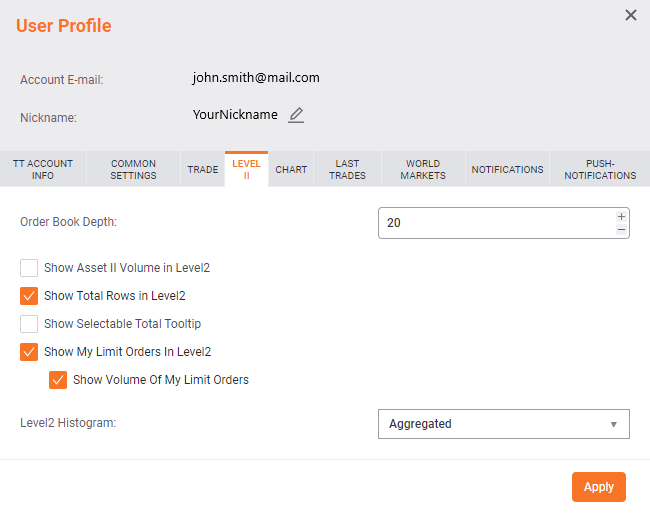
- Order book depth: Number of price levels in the order book.
- Show Asset II Volume in Level2: Show or hide the volume of the second asset in L2.
- Show Total Rows in Level2: Show or hide the average price and total volume for Buy and Sell orders.
- Show Selectable Total Tooltip: Show average price and total values in volume units.
- Show My Limit Orders in Level2: Show or hide your Limit Orders and their Volume in L2.
- Level2 Histogram: The histogram shows Buy/Sell volumes and prices updated in real time.
- Aggregated: Aggregated data on volume and price.
- Not aggregated: Non-aggregated data.
- None: The histogram is hidden.
Chart
- Show Orders on Chart: Select this option to display order lines on the chart.
- Show Positions on Chart: Select this option to display positions on the chart.
- Show Positions TP/SL on Chart: Select this option to display positions Take Profit/Stop Loss on the chart.
Last Trades
- Show Asset II in T&S: Select this option to display Asset II in the Last Trades panel.
- Last Trades Histogram: Select the display mode of the Last Trades Histogram (Gradient, Right, Left, None).
World Markets
In this section you can find the information about World Markets: City, Name of the Exchange, Trade session hours.
- Show World Markets Clocks: Select this option to show/hide the World Markets Clocks Panel.
- Select from the list the Market Clocks you want to show/hide.
Notifications
- Server notifications: Select the notifications you want to receive and the way you receive them ( Push, Email, Telegram ).
- Server Communication: Here you can manage Advanced settings of Server notifications and set up telegram notifications.
Push-Notifications
- Turn on Push-Notifications: Select the checkbox to enable push-notifications for your account.
You can disable the push-notifications for the trade account by clicking Drop selected subscription(s).